top of page


Rosemist Windvale

Introduction
Rosemist Windvale is a small town tucked between forests and rolling hills. At dawn, a blush-tinted mist rises from the grass and hedges like cloud wisps stirred by the windmill softly glazing the village edges in rose. Locals believe the fog carries messages from the wind, so when lanterns glow at dusk, people often linger by the plaza fountain, waiting for the haze to thin before deciding whether to follow the path toward the distant windmill and the castle ruins beyond.

Background
This scene is set in a small valley town surrounded by forests and soft hills. A light pink mist rolls in during mornings and evenings, making the streets and rooftops feel calm and dreamy. There is a fountain in the center, plus a windmill and old ruins in the distance, hinting that there is more to discover if you keep walking.
Date of completion: Dec 2025
Software&Role
PyCharm
Unreal Engien
Blender
Substance Designer
Photoshop
Environment Artist
Technical Artist: Rendering
Detail


UE Landscape


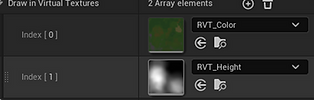

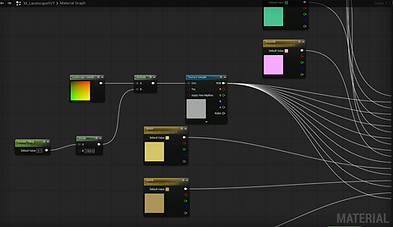

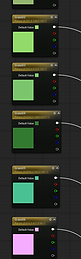



I blocked out the terrain with broad hills and set the main height shapes first, then painted several grass and dirt layers on the surface. For materials, I set up an RVT workflow, writing landscape data into a Runtime Virtual Texture and sampling it in the grass material. Texture scale is controlled with a tiling parameter, and I used a few color parameters for overall color adjustment.


I modeled simple grass cards in Blender, set up UVs, and prepared an opacity mask texture, then created a wind noise texture and a grass detail texture in Substance Designer. In Unreal, I built the grass material by panning the noise texture and exposing parameters like Tiling, Speed, and Amount, then wired the result into color variation and the SimpleGrassWind setup. Finally, I used Blueprint to create a dynamic material instance and drove the wind parameters with a Timeline.
Stylize Grass


VDB Cloud
I wrote a Blender addon in Python called VDB Cloud Fog Helper and placed it in the View3D sidebar. It validates the selection and only activates when a Fluid Domain is selected. The addon includes two preset buttons, Fog Profile and Cloud Profile, which apply common domain settings like resolution, time scale, vorticity, and noise. It also provides Bake Data / Bake Noise / Bake All buttons that set the cache to OpenVDB, sync the cache frame range with the timeline, and trigger Blender baking via a context override.


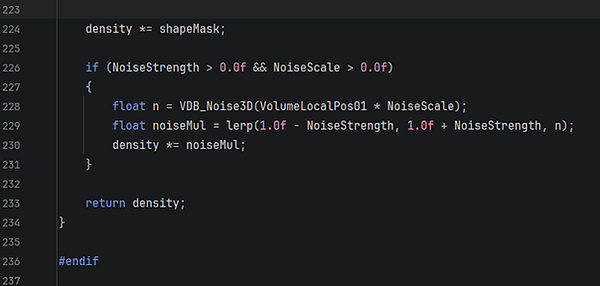


I implemented a custom HLSL volume shading helper for VDB clouds and integrated it into an Unreal Engine material via Custom nodes. The shader evaluates density, scattering albedo, and emission separately, and exposes art-directable controls such as a height-based gradient, camera-distance fade, and soft sphere/box falloff masks for shaping the cloud volume. To break up uniformity, it layers 3D noise to add internal variation and depth. In the material graph, I compute 0–1 local volume UVW from the object bounds, sample the imported sparse volume texture, and route the resulting density/albedo/emission into UE’s real-time volumetric shading to achieve the layered pink cloud look.
Contact
I'm always looking for new and exciting opportunities. Let's connect.
+86 18978911207
bottom of page